Tasks in your
Menu Bar.

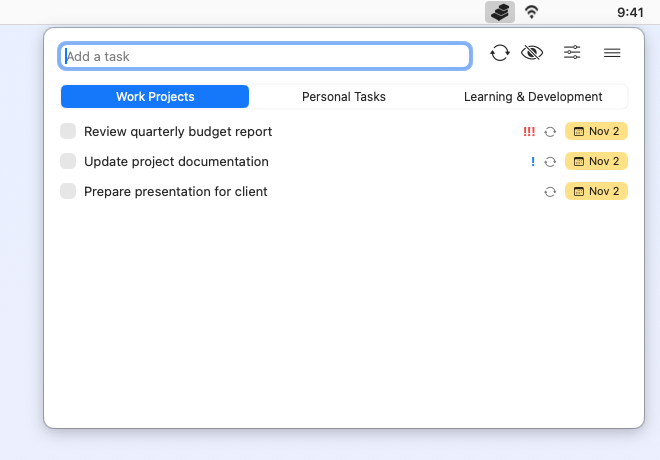
Manage tasks right from your macOS menu bar.
Quick access, minimal distraction, maximum productivity.
Sync with Google Tasks to access your tasks anywhere.

Taskin - Menu Bar Task Manager

Sound familiar?

😡

Too many features

You tried powerful task management apps, but they're so complex with settings and features that you end up not using them...

πŸ“

Tedious task entry

Adding a task requires too many clicks, making you feel like writing on paper would be faster...
Taskin
solves everything

  • βœ“

    Menu Bar Access

    Manage tasks directly from your menu bar. One click to view, add, or complete tasks without switching apps.

  • βœ“

    Google Tasks Sync

    Two-way sync with Google Tasks. Changes you make in Taskin are sent right away, and Google's changes come in the first time you open Taskin after it starts, or when you run Sync Google Todo.

  • βœ“

    Minimal & Fast

    Lightweight app that stays out of your way. No bloat, no distractions - just your tasks.

See Taskin in action

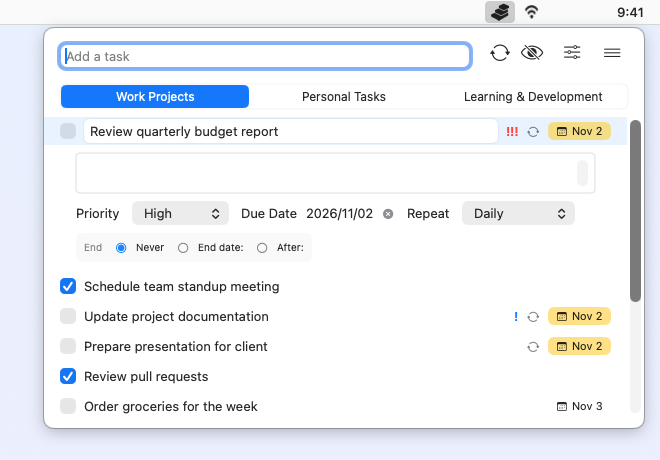
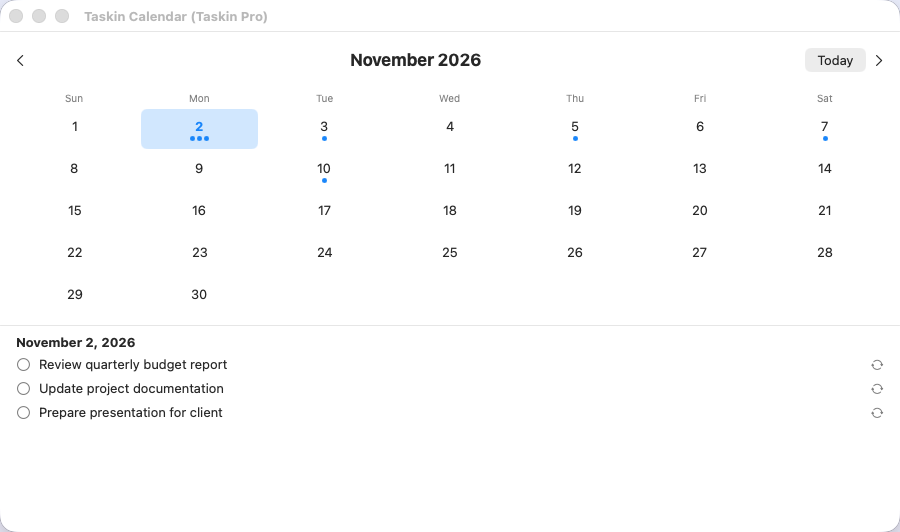
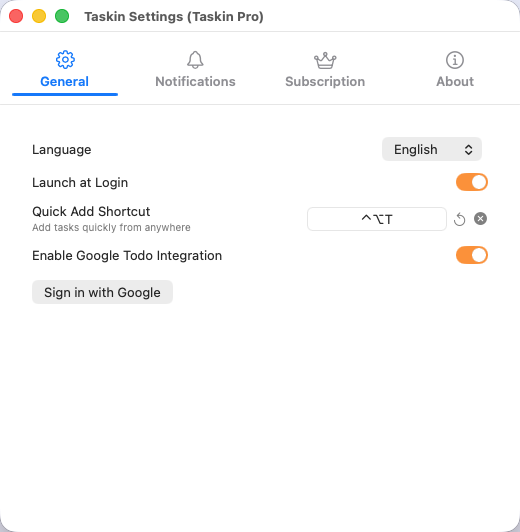
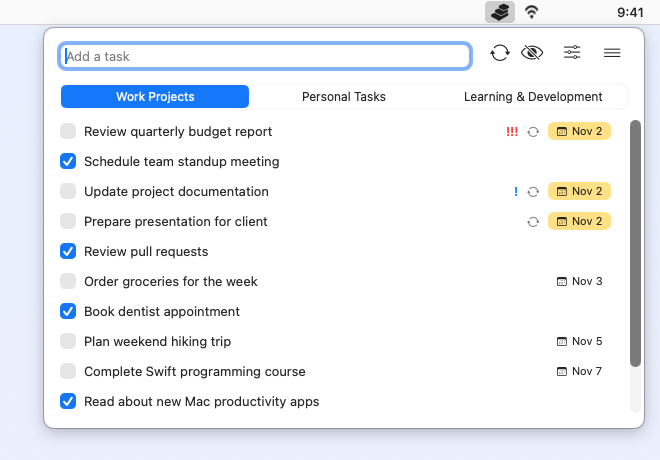
Taskin β€” task list in the menu bar Taskin β€” Today filter with priorities Taskin β€” recurring task settings Taskin β€” calendar month view Taskin β€” settings with Quick Add Shortcut and Launch at Login

Key Features

πŸ“

Menu Bar App

Lives in your menu bar for instant access. View and manage tasks with a single click - no app switching needed.

πŸ”„

Google Tasks Sync Pro

Two-way sync between Taskin and Google Tasks. Local changes are pushed instantly; Google changes are pulled once when you first open Taskin after it starts, and whenever you run Sync Google Todo from the toolbar or the menu.

⚑

Quick Entry

Type in the β€œAdd a task” field and press Return, or press βŒƒβŒ₯T (customizable) in any app to open the Quick Add window. With Pro, choose which Google Tasks list it goes to. The window closes as soon as you click elsewhere.

πŸ“

List Tabs Pro

View your Google Tasks lists as switchable tabs. Organize tasks by project or purpose.

πŸ”

Recurring Tasks

Set daily, weekly, monthly, yearly, or custom day intervals (every N days). Choose weekdays and end conditions for full flexibility.

πŸ—“οΈ

Calendar View

See all your tasks on a monthly calendar. Visualize deadlines and plan ahead at a glance.

πŸ“…

Due Dates

Set due dates on tasks to manage deadlines effectively.

🎨

Native macOS

Built for Mac. Beautiful design that feels right at home on your desktop.

πŸ””

Notifications

Get task reminders and alerts. Never forget a due date with customizable notifications.

🎯

Today, Upcoming & No Date

Focus on what is due. From View Options, show only Today (with overdue tasks grouped at the top), Upcoming, or No Date tasks.

❗

Priorities

Mark tasks High, Medium, or Low and spot them at a glance by their ! marks. Change priority with a right-click, sort by priority or due date, or show High Only.

πŸ”€

Move Between Lists Pro

Drag a task onto another list tab to move it. The move is applied in Google Tasks too.

πŸš€

Launch at Login

Turn on Launch at Login in Settings so Taskin is in your menu bar every time you start your Mac.

πŸ“œ

History View

Browse all your tasks, including completed and hidden ones, with their list and created and completed dates. Search, sort, filter by status, and bulk-delete old completed tasks.

Perfect for you if...

πŸ‘¨β€πŸ’»

You want simplicity

No complex features needed. Just add, complete, and organize tasks. That's all you want.

🍎

You're a Mac user

Native macOS integration provides a smooth and seamless experience.

Pricing

Free

Basic

$0
Free forever
  • βœ“Unlimited tasks
  • βœ“Due dates
  • βœ“Recurring tasks
  • βœ“Calendar view
  • βœ“Notifications
  • βœ“No ads
RECOMMENDED
Pro

Taskin Pro

$2.99/mo
πŸŽ‰ First month FREE β€” try all Pro features
  • βœ“All Basic features
  • β˜…Google Tasks Sync
  • βœ“List Tabs (Google Tasks lists)
  • βœ“Two-way sync
  • βœ“1 month free trial

Prices are shown in US dollars. The amount charged follows your region's App Store price.

Frequently Asked Questions

What is Taskin?

Taskin is a lightweight menu bar task manager for macOS. It lives in your status bar so you can quickly view, add, and complete tasks without switching apps. It's designed for people who want simple, fast task management right from the macOS menu bar.

Is it free?

Yes! The basic version of Taskin is completely free with unlimited tasks, due dates, recurring tasks, calendar view, and no ads. The Pro plan ($2.99/month) adds Google Tasks sync and list tabs (your Google Tasks lists shown as tabs). You can try Pro free for 1 month.

Does it sync with Google Tasks?

Yes, with Taskin Pro. The Pro plan enables two-way sync between Taskin and Google Tasks. Local changes are pushed to Google instantly; Google changes are pulled once when you first open Taskin after it starts, and whenever you run Sync Google Todo from the toolbar or the menu.

Can I get notifications for tasks?

Yes! Taskin supports macOS notifications for task reminders. Set due dates on your tasks and receive alerts so you never miss a deadline. Notifications work natively with macOS notification center. Reminders are off by default: turn on Enable Due Date Reminders in Settings > Notifications and choose when to be reminded.

What are the system requirements?

Taskin requires macOS 14.0 (Sonoma) or later.